
Complete Wicofly Store Setup Guide: 3 Easy Steps
Master your wicofly store setup with our complete review of features, pricing, and onboarding steps. Launch your digital storefront today!

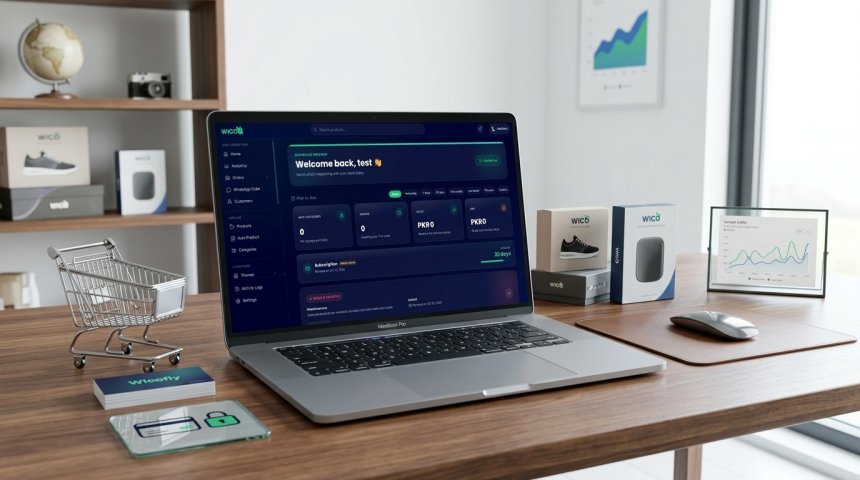
When creators and small business owners decide to establish a digital presence, they face many choices about where to build an online store. Simple, centralized platforms can appeal to independent makers who want to focus on their products rather than on technical setup. One option in the digital commerce space is Wicofly, an online-store platform that presents itself as an all-in-one service for creators who want to build and grow online stores.
According to information on the official Wicofly website, the service is designed for creators and vendors who need a straightforward way to launch a storefront. It is not an airline or aviation service. Understanding how the platform operates requires examining its setup process, inventory tools, themes, domain options, analytics, trial terms, payment arrangements, and current feature limitations. Reviewing these details can help prospective merchants decide whether the platform fits their operational goals.
Core Setup Steps for Launching a Storefront
Setting up a digital storefront can involve multiple technical decisions. Wicofly presents store creation as a three-step process intended to simplify onboarding. The first step involves signing up for an account. According to the platform’s terms, effective August 3, 2026, account sign-in uses email and one-time-password verification. This means that authentication is based on a temporary verification code rather than a traditional password system.
After signing up, users choose a store name. Wicofly says that merchants can then receive a free wicofly.com subdomain, giving them a web address for their storefront without requiring them to purchase a separate domain immediately. The second step focuses on adding products and managing inventory. The platform advertises support for product photos, variants, pricing, stock tracking, and low-stock alerts. The third step is publishing the storefront.
This workflow presents store creation as a relatively direct process: sign up, add products and inventory information, and publish the store. The official homepage describes the process and available features in more detail at www.wicofly.com.
Testing the Platform Through Trial Periods
Evaluating software before committing financial resources can be important for independent vendors. Wicofly advertises a seven-day free trial. The company states that no credit card is required to begin the trial and that users may cancel at any time.
This arrangement gives prospective merchants an opportunity to examine the store-building process before making a longer-term commitment. During the trial, users can review the dashboard, add product information, examine available themes, and consider whether the advertised inventory and analytics tools suit their needs. The available evidence confirms the length and basic conditions of the trial, but it does not establish that every feature is available in an identical form during the trial period.
Because the trial lasts seven days, merchants may want to prepare product information and images in advance. Doing so can make it easier to evaluate the setup workflow within the available period. Users should also review the current official terms and platform information before relying on any feature for a live business operation.
Managing Product Inventory and Stock Levels
Inventory control is an important part of retail operations. Without accurate stock information, store owners may have difficulty knowing when products need replenishment or when an item should be marked unavailable. Wicofly advertises tools intended to help vendors manage these basic inventory tasks.
According to the platform’s public feature descriptions, merchants can add product photos, configure product variants, set prices, track stock, and receive low-stock alerts. These features may be useful for sellers offering products with multiple options, such as different sizes, colors, or other variations. Stock tracking can also help merchants monitor available quantities from a central dashboard.
The available research does not establish the platform’s full inventory architecture, including whether it supports advanced forecasting, warehouse routing, or extensive integrations. Merchants with complex fulfillment requirements should therefore evaluate the available tools directly rather than assuming that basic stock tracking includes enterprise-level inventory management.
Themes and Visual Customization Options
A storefront’s appearance affects how customers view a business. Wicofly advertises free, mobile-ready themes designed to help merchants present their products across different screen sizes.
The platform also states that themes can be changed without developer assistance. This can give store owners an accessible way to adjust the appearance of a storefront as their catalog or visual identity changes. Mobile-ready designs may be particularly relevant to merchants whose visitors use phones or tablets to browse.
However, the reviewed evidence does not specify the total number of themes, the depth of layout customization, or the availability of advanced design controls. Prospective users should inspect the current theme selection and determine whether the available templates provide the branding flexibility they require.
Domain Management and Security Certificates
A storefront needs a web address that customers can use to find it. Wicofly advertises two domain options. Merchants can use a free Wicofly subdomain or connect a custom domain that they already own.
The company also states that SSL certificates are included automatically. SSL, commonly associated with encrypted connections, helps protect information transmitted between a visitor’s browser and a website. Automatic certificate handling can reduce the amount of technical configuration required from merchants.
The available research confirms that Wicofly advertises automatic SSL certificates, but it does not provide a complete technical explanation of its certificate management, renewal procedures, or security architecture. Merchants should review the platform’s current documentation and confirm how their selected domain is configured before launch.
Analytics and Performance Dashboards
Operating an online store often requires reviewing performance information. Wicofly advertises a dashboard intended to show sales, visitors, and top-performing products.
These categories can give merchants a basic view of storefront activity. Sales information may help owners understand purchasing performance, visitor figures may indicate how much traffic reaches the store, and product rankings may help identify items receiving the most attention. For small vendors, a central dashboard can be a practical starting point for reviewing store activity.
The reviewed material does not establish that Wicofly provides advanced conversion analysis, detailed customer segmentation, or extensive external analytics integrations. Merchants who require those capabilities should verify the current dashboard before selecting the platform for a more complex reporting program.
Understanding Current Feature Limitations
Wicofly presents several core tools for creating and managing an online store, but its public website also identifies features that are not yet fully available. “SEO & Meta Data” and “Secure Payments” are listed as coming soon. These features should therefore not be described as fully available without additional confirmation.
The platform’s terms provide more detail about payment processing. They state that payments may be processed through Stripe and that Wicofly does not store card details or payment credentials. This description indicates that payment handling may involve a third-party processor rather than local storage by Wicofly.
Because the homepage lists secure payments as coming soon while the terms discuss payment processing through Stripe, prospective merchants should distinguish between advertised future features and the payment arrangements currently available to their account. They should confirm the live checkout workflow, supported payment options, and regional availability before accepting customer orders.
Merchants who require advanced SEO controls, extensive metadata settings, or specialized payment functionality should verify the current deployment status of those tools before moving an established operation to the platform. The official terms and conditions provide the most authoritative information reviewed for account and payment provisions.
Event Pages and Alternative Use Cases
Wicofly’s terms state that users may create and manage online stores and event pages. This indicates that the platform’s intended use can extend beyond a standard product storefront.
An event page may be relevant to creators, organizers, or other users who need to present information about an event through the platform. However, the reviewed evidence does not establish that Wicofly provides a complete ticketing system, registration management, attendee coordination, or event-payment workflow. Those capabilities should not be assumed solely because event pages are mentioned in the terms.
Users considering the platform for events should confirm what an event page can do, whether payments are supported for that use case, and which tools are currently available. The terms establish the existence of event pages as a permitted use, but they do not provide a complete description of event-management functionality.
Comparing Simplicity with Enterprise E-Commerce Solutions
Choosing an e-commerce platform often involves balancing ease of use with feature depth. Larger and more complex systems may provide extensive customization, integrations, and operational controls, while lightweight platforms generally emphasize faster setup and simpler management.
Wicofly presents itself as an all-in-one platform for creators to build and grow online stores. Its advertised three-step setup, free subdomain, mobile-ready themes, automatic SSL certificates, inventory tools, and seven-day trial position it as an accessible option for users who want to begin with a relatively straightforward storefront.
At the same time, the platform’s public information does not establish that it offers advanced enterprise tools such as complex warehouse routing, extensive application programming interfaces, or detailed multi-channel inventory controls. Larger businesses should compare their operational requirements with the features currently available. Independent creators and smaller vendors may find the advertised simplicity more relevant than a long list of advanced options.
Evaluating Vendor Support and Platform Transparency
When evaluating any web platform, understanding the company behind the service and its support infrastructure is important. Available evidence identifies Wicofly as an online-store and e-commerce platform. Its public website does not clearly identify the legal entity, founders, headquarters, launch date, or independently verified customer or vendor totals.
The homepage includes a promotional reference to “2,000+ vendors subscribed,” but the reviewed evidence does not independently verify that figure or provide a date for the claim. Prospective users should treat it as a promotional statement rather than as an independently confirmed customer count.
A practical evaluation can include reviewing the official website, reading the terms, testing the trial, and determining whether the platform’s available support channels meet the merchant’s needs. Users should also test a small set of products and confirm how domains, inventory, analytics, and payment processing work before depending on the service for a larger launch.
Future Outlook for Creator Economy Platforms
Online-store platforms can reduce the technical work involved in creating a digital storefront. Tools that combine store setup, product management, themes, domains, and analytics may appeal to creators who want to begin selling without assembling multiple services.
Wicofly’s public materials emphasize quick setup and accessible store-management features. Its future usefulness for different types of merchants will depend in part on how its listed upcoming features develop. SEO and metadata tools, as well as secure-payment functionality listed as coming soon, may be important to users who need deeper control over search visibility or checkout operations.
For now, prospective merchants should evaluate the platform according to the features that are documented as available rather than relying on future functionality. Reviewing official updates directly on Wicofly’s website can help users distinguish current tools from features that remain under development.
Frequently Asked Questions About Wicofly
What is Wicofly?
Wicofly is an online e-commerce platform and store builder for creators and vendors. It advertises tools for creating a storefront, adding products, managing inventory, applying mobile-ready themes, connecting a domain, and reviewing basic store analytics.
How does the free trial work?
Wicofly advertises a seven-day free trial. The company states that no credit card is required and that users can cancel at any time. Merchants should confirm the current trial terms before signing up.
What is included in the store setup process?
Wicofly presents store creation as a three-step workflow: sign up, add products and manage inventory, and publish the storefront. Account sign-in uses email and one-time-password verification according to the platform terms. Users can also choose a store name and receive a free Wicofly subdomain.
Can I use my own custom domain?
Yes. Wicofly advertises the ability to connect a custom domain or use a Wicofly subdomain. The company also states that SSL certificates are included automatically.
Are advanced SEO and payments fully available?
The website lists “SEO & Meta Data” and “Secure Payments” as coming soon. The terms state that payments may be processed through Stripe and that Wicofly does not store card details or payment credentials. Merchants should verify the current payment and SEO capabilities before relying on them.
Can I create event pages using the platform?
The terms state that users may create and manage event pages. The reviewed evidence does not confirm a complete ticketing, registration, or attendee-management system, so users should verify the available event features directly.
Navigating Account Security and Authentication
Securing access to a digital storefront begins with account authentication. Wicofly’s terms state that account sign-in uses email and one-time-password verification. This means users authenticate through an email-based process that includes a temporary code.
One-time-password systems can reduce the need for users to create and remember a permanent password. However, the reviewed evidence does not provide a complete description of Wicofly’s security controls, account-recovery procedures, session management, or additional authentication options. Merchants should consult the current account process and platform terms when assessing administrative security.
The official account portal is available at accounts.wicofly.com. Users should protect access to the email account associated with their store because email-based verification is part of the stated sign-in process.
Understanding Transaction Flows and Payment Security
Payment handling is an important consideration for any online store. Wicofly’s terms state that payments may be processed through Stripe and that Wicofly does not store card details or payment credentials.
This arrangement suggests that sensitive payment information may be handled by a third-party processor rather than stored directly by Wicofly. However, the reviewed material does not establish which payment methods, currencies, regions, or checkout configurations are available to every merchant.
The website also lists “Secure Payments” as coming soon. Therefore, users should distinguish between the payment processing language in the terms and the separate feature-status label on the homepage. Before launching, merchants should verify how checkout works for their account and whether the available payment process meets their customers’ needs.
Examining the True Scope of Independent Creator Tools
Independent creators may sell products through online storefronts, manage several product variants, and adjust stock levels as their businesses develop. A platform that combines these functions with themes, domains, and analytics can reduce the number of separate tools a merchant needs to manage.
Wicofly advertises product photos, variants, pricing, stock tracking, low-stock alerts, mobile-ready themes, domain options, SSL certificates, and a dashboard showing sales, visitors, and top-performing products. Together, these features describe a basic set of tools for creating and monitoring an online store.
At the same time, merchants should remain realistic about the limits of the available evidence. The reviewed pages do not clearly document advanced inventory forecasting, multi-warehouse operations, extensive custom integrations, or other enterprise functions. As a business grows, its operational needs may change. Evaluating those requirements early can help creators decide whether Wicofly is suitable for their current stage.
Step-by-Step Transitioning: Moving from Concept to Launch
For entrepreneurs preparing a new product line or storefront, a structured launch process can make platform testing more efficient. The following workflow reflects Wicofly’s documented setup sequence while separating confirmed platform features from general preparation tasks.
- Define the Store Concept: Identify the products or services that will be presented through the storefront and organize the information required for each listing.
- Prepare Store Assets: Gather product photographs, names, prices, and variant information before beginning the setup process.
- Create the Account: Sign up using the email-based authentication process and complete one-time-password verification.
- Choose a Store Name: Select a store name and use the free Wicofly subdomain provided by the platform, or prepare a custom domain for connection.
- Add Products and Inventory: Upload product photos, configure variants and prices, and use the advertised stock-tracking tools and low-stock alerts where appropriate.
- Select a Theme: Choose a free, mobile-ready theme and adjust the storefront appearance without developer assistance.
- Review Domains and SSL: Confirm whether the store will use the Wicofly subdomain or a custom domain, and verify that the advertised SSL certificate is active.
- Review Store Information: Use the dashboard to examine the available sales, visitor, and top-product information.
- Confirm Payment Functionality: Review the current checkout and payment arrangements, including any Stripe processing, before directing customers to the store.
- Publish the Storefront: Publish the store once the product information, domain configuration, and available features have been reviewed.
This process follows the platform’s advertised setup model while encouraging merchants to verify features that are still listed as coming soon.
Operational Best Practices for Solo Merchants
Running an online storefront requires consistent attention to product data and store information. Even when a platform provides inventory and analytics tools, merchants remain responsible for reviewing their records and confirming that the storefront accurately represents what they offer.
- Review Inventory Records: Use the advertised stock-tracking features and low-stock alerts, while checking that digital quantities match the merchant’s actual records.
- Maintain Product Information: Keep product photos, prices, variants, and descriptions current so visitors receive accurate information.
- Monitor Store Activity: Review the available dashboard information about sales, visitors, and top-performing products to understand how the storefront is performing.
- Check the Storefront on Mobile Devices: Because Wicofly advertises mobile-ready themes, merchants should still review how their selected theme displays on the devices used by their audience.
- Verify Payment Arrangements: Confirm the active payment process and available options before promoting the storefront widely.
- Review Platform Terms: Revisit the official terms and feature descriptions when the business changes or when Wicofly announces new capabilities.
These habits can help solo creators make practical use of the platform’s documented tools while avoiding assumptions about features that have not been confirmed.
Final Thoughts on Lightweight E-Commerce Ecosystems
Accessible e-commerce tools have made it easier for creators and independent vendors to establish an online presence. Platforms that combine store creation, inventory management, themes, domains, SSL certificates, and basic analytics can reduce the number of technical tasks required to publish a storefront.
Wicofly presents a lightweight approach centered on a three-step setup process. Its advertised features include a free subdomain, a seven-day trial without a credit card, product and inventory tools, mobile-ready themes, custom-domain support, automatic SSL certificates, and a dashboard for sales, visitor, and product information.
The platform also has important limitations that prospective users should consider. SEO and metadata tools and secure payments are listed as coming soon. The terms state that payments may be processed through Stripe and that Wicofly does not store card details or payment credentials, but the precise payment experience may depend on the merchant’s account and region. The available evidence also does not independently verify promotional vendor figures or clearly identify Wicofly’s legal entity, founders, headquarters, or launch date.
Ultimately, merchants should assess Wicofly according to the features currently documented and test the platform during the advertised trial. Reviewing official information on www.wicofly.com and the Wicofly terms and conditions can help users remain informed about available tools, account requirements, payment provisions, and future feature changes.
Frequently Asked Questions About Platform Setup and Management
As creators and independent business owners explore digital storefront solutions, several questions commonly arise about onboarding, domains, payments, and daily management. The following answers are based on the reviewed Wicofly website and terms.
What is required to sign up for an account?
Wicofly’s terms state that account sign-in uses email and one-time-password verification. Users should follow the current registration process shown by the platform and review the applicable account requirements in the official terms.
Can I test the platform before paying?
Yes. Wicofly advertises a seven-day free trial without requiring a credit card. The company also states that users can cancel at any time. Merchants should confirm the current trial conditions during registration.
How do customers pay for products?
The terms state that payments may be processed through Stripe and that Wicofly does not store card details or payment credentials. The website separately lists “Secure Payments” as coming soon, so merchants should verify the currently available checkout process before launching.
Are there built-in tools for selling event tickets?
The terms state that users may create and manage event pages. The reviewed evidence does not confirm a complete ticketing or registration system. Anyone planning to use Wicofly for an event should verify the specific tools available.
What domain options are available for new stores?
Merchants can use a free wicofly.com subdomain after choosing a store name, or they can connect a custom domain. Wicofly also advertises automatic SSL certificates.
Which inventory tools are advertised?
The platform advertises support for product photos, variants, pricing, stock tracking, and low-stock alerts. The reviewed evidence does not establish whether advanced warehouse or forecasting tools are included.
What analytics are available?
Wicofly advertises a dashboard intended to show sales, visitors, and top-performing products. More advanced reporting capabilities are not confirmed by the reviewed sources.
Where can I find official updates and platform information?
The primary source for current platform information is www.wicofly.com. Account and payment provisions can be reviewed in the terms and conditions, while the sign-in process is available through accounts.wicofly.com.
Share
What's Your Reaction?
 Like
0
Like
0
 Dislike
0
Dislike
0
 Love
0
Love
0
 Funny
0
Funny
0
 Angry
0
Angry
0
 Sad
0
Sad
0
 Wow
0
Wow
0