
Live Face Swap Video: Real-Time AI Architecture, Latency & Character Consistency
Explore live face swap video technology, including real-time AI architecture, latency optimization, character consistency, streaming integration, quality benchmarks, and ethical safeguards.

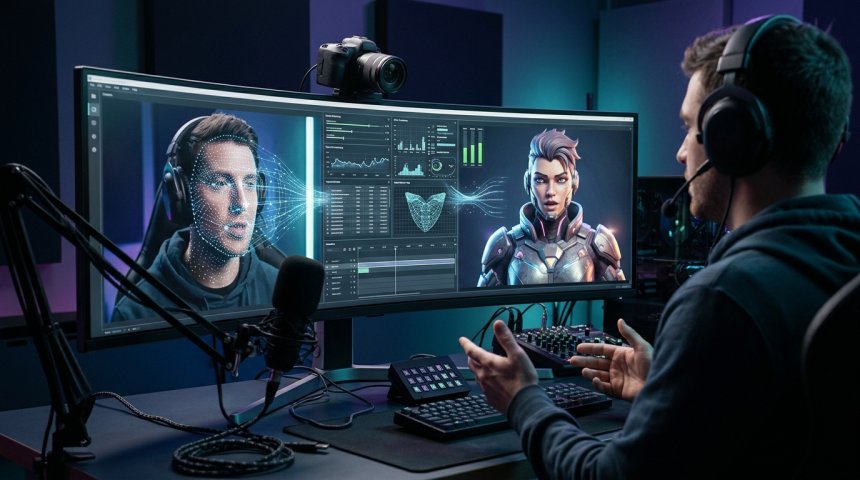
Live face swap technology has crossed the threshold from novelty experiment to viable creative medium, enabling performers, streamers, educators, and digital artists to embody characters in real-time with sufficient fidelity that audiences suspend disbelief and engage with the performance rather than the artifact. This transformation didn't happen through a single breakthrough but through convergent advances across multiple technical domains: GPU-accelerated neural inference reducing swap latency below perceptual thresholds, facial landmark tracking achieving sub-pixel accuracy under variable lighting and expression, temporal consistency algorithms eliminating the flicker that previously broke immersion, and streaming infrastructure integrating virtual camera outputs seamlessly into broadcast workflows. Yet technical capability alone doesn't produce compelling character video; the gap between functional face swap and believable character performance spans artistic discipline, ethical responsibility, workflow optimization, and audience psychology that pure engineering cannot bridge.
This guide treats live face swap character video as integrated practice combining technical mastery with creative intentionality and ethical awareness. We'll examine the computational architecture enabling real-time swapping including model selection trade-offs between quality and latency, hardware requirements spanning budget to professional tiers, and software ecosystem navigation across open-source and commercial options. We'll explore character consistency techniques maintaining identity coherence across expressions, angles, and lighting conditions that separate convincing performances from uncanny distractions. We'll address the ethical dimensions that distinguish responsible creative expression from harmful deception including consent frameworks, disclosure practices, and community standards. We'll cover streaming integration workflows for platforms from Twitch to Zoom, quality benchmarking methodologies for objective evaluation, troubleshooting protocols for common failure modes, and creative applications spanning entertainment, education, therapy, and digital identity exploration. Whether you're a VTuber building consistent character presence, a filmmaker prototyping VFX shots in real-time, an educator creating engaging avatar-led instruction, a therapist exploring identity work through digital embodiment, or a technologist evaluating real-time face swap capabilities for application development, this guide delivers the depth needed to move beyond tutorial-level understanding toward professional-grade practice.
Let's begin by establishing what "live" actually means in this context—and why precision about latency, quality, and interactivity determines everything downstream.
Chapter 1: Defining Live Face Swap — Technical Boundaries and Creative Possibilities
"Live face swap" encompasses a spectrum of real-time facial manipulation technologies with fundamentally different capabilities, constraints, and appropriate applications. Precision prevents mismatched expectations.
Real-Time vs. Near-Real-Time vs. Post-Production
True Real-Time (<33ms / 30+ FPS): Swap completes within single video frame interval enabling interactive performance where facial expressions transfer instantaneously without perceptible delay. Requires dedicated GPU inference, optimized models, and efficient pipeline architecture. Enables live streaming, video conferencing, interactive installations, and performance capture. Latency below human perception threshold (~20-30ms for visual-audio sync) creates seamless embodiment experience. True real-time is gold standard for live character performance but demands significant compute resources and technical optimization.
Near-Real-Time (33-200ms / 5-30 FPS): Noticeable but tolerable delay suitable for pre-recorded content with live-feel aesthetic, asynchronous video messages, or situations where perfect sync unnecessary. Lower hardware requirements enable broader accessibility. Acceptable for many creative applications where absolute synchronicity not critical. Trade-off between quality and latency more flexible; higher-quality models usable at reduced frame rates. Near-real-time democratizes access while sacrificing interactive responsiveness.
Post-Production Offline Processing: Unconstrained by latency enabling maximum quality through multi-pass refinement, temporal smoothing, and manual correction. Not "live" despite marketing claims by some tools. Appropriate for film, television, and high-production content where perfection matters more than immediacy. Understanding this distinction prevents selecting post-production tools for live applications or expecting live tools to match post-production quality.
Face Swap vs. Face Reenactment vs. Avatar Driving
Face Swap (Identity Transfer): Transfers source face identity onto target video preserving target's expressions, head pose, and lighting. Source provides appearance; target provides motion. Best for embodying specific character likenesses while retaining performer's natural expressiveness. Limitations include identity-expression mismatch when source and target facial structures differ significantly. Most common interpretation of "live face swap."
Face Reenactment (Expression Transfer): Transfers source expressions onto target identity preserving target's appearance while adopting source's facial movements. Source provides motion; target provides appearance. Enables driving static character images or 3D models with live performance. Complementary to face swap; sometimes combined in hybrid pipelines. Reenactment excels when character design fixed and performer provides animation.
Avatar Driving (Parametric Control): Maps facial landmarks to parametric 3D model rig enabling full character animation from live performance. Not technically "face swap" but occupies adjacent creative space. Enables non-human characters, stylized aesthetics, and complete visual control. Higher setup complexity but greater creative flexibility. Technology stack overlaps significantly with face swap (tracking, inference) diverging at rendering stage.
Understanding these distinctions ensures tool selection matches creative intent. Face swap serves identity embodiment; reenactment serves expression animation; avatar driving serves character creation. Hybrid approaches combine strengths but increase complexity.
Key Insight: For foundational face analysis, detection, and swapping algorithms powering most real-time implementations, InsightFace Open-Source Face Analysis Library Documentation (dofollow) provides comprehensive technical documentation, pre-trained models, and implementation examples forming the backbone of both open-source and commercial live face swap systems.
Chapter 2: Computational Architecture — Hardware, Models, and Pipeline Optimization
Real-time face swap demands coordinated optimization across hardware, model architecture, and software pipeline. Bottlenecks anywhere degrade entire system.
GPU Requirements and Selection
Minimum Viable Configuration: NVIDIA RTX 3060 (12GB VRAM) or AMD RX 6700 XT (12GB VRAM) enables basic real-time swap at 720p/15-20 FPS using lightweight models. Sufficient for learning, experimentation, and low-demand applications. Insufficient for professional streaming at 1080p/30 FPS with high-quality models. Budget entry point ~$300-400.
Recommended Streaming Configuration: NVIDIA RTX 4070 Super (12GB VRAM) or RTX 4070 Ti Super (16GB VRAM) achieves 1080p/30 FPS with mid-tier models or 720p/30 FPS with high-tier models. Sweet spot for serious streamers balancing cost and performance. Supports concurrent streaming encoding and face swap inference. Price range $500-800.
Professional Production Configuration: NVIDIA RTX 4090 (24GB VRAM) or dual-GPU setups enable 1080p/60 FPS or 4K/30 FPS with high-quality models. Necessary for professional productions, multi-person swaps, or simultaneous high-resolution streaming. Diminishing returns beyond this tier for most applications. Price range $1,600-3,000+.
VRAM as Primary Constraint: Video RAM determines maximum model size, resolution, and batch processing capability. Models exceeding VRAM force CPU offloading causing catastrophic latency increases. 8GB minimum for any real-time work; 12GB comfortable; 24GB future-proof. VRAM prioritized over raw compute speed for face swap workloads. Cloud GPU rental (RunPod, Lambda) viable alternative for occasional high-demand projects without permanent hardware investment.
Apple Silicon Considerations: M-series Macs with unified memory enable large model loading exceeding discrete GPU VRAM limits. MPS (Metal Performance Shaders) backend improving but still behind CUDA ecosystem in optimization and compatibility. Viable for near-real-time and development; true real-time performance lags equivalent NVIDIA hardware. Evaluate specific model compatibility before committing to Apple ecosystem for live applications.
Model Architecture Selection
Lightweight Models (MobileFaceNet, ArcFace-Lite): Parameter count <10M enabling >30 FPS on mid-tier GPUs. Quality sufficient for stylized characters, distant viewing, or mobile applications. Limited detail preservation and identity fidelity at close range. Best for: budget hardware, mobile deployment, background characters, stylized aesthetics.
Mid-Tier Models (InsightFace R50, SimSwap): Parameter count 25-50M balancing quality and speed achieving 20-30 FPS at 1080p on recommended hardware. Good identity preservation with acceptable artifact levels. Most versatile category serving majority of streaming and creative applications. Best for: general streaming, content creation, educational avatars, moderate-quality requirements.
High-Quality Models (FaceFusion, Rope, DeepFaceLive High): Parameter count 50-100M+ maximizing fidelity at cost of speed (10-20 FPS at 1080p on recommended hardware). Superior detail preservation, better edge blending, more accurate color matching. Requires powerful hardware or resolution/frame rate compromise. Best for: professional productions, close-up performance, high-fidelity character work, post-production-adjacent quality.
Model Specialization Trade-offs: General-purpose models handle diverse faces adequately but excel at none. Fine-tuned models optimized for specific demographics, lighting conditions, or character types outperform general models within specialization domain at cost of versatility. Character-specific fine-tuning worthwhile for performers using consistent character long-term. Model selection should match primary use case rather than seeking universal solution.
Pipeline Optimization Techniques
TensorRT / ONNX Runtime Acceleration: Model conversion to optimized inference engines reduces latency 30-60% versus native PyTorch/TensorFlow execution. TensorRT (NVIDIA) provides best optimization for CUDA GPUs; ONNX Runtime offers cross-platform compatibility with good performance. Conversion requires one-time effort yielding permanent speedup. Essential for production deployments; optional for experimentation.
Temporal Consistency Filtering: Frame-by-frame independent processing causes flickering and jitter breaking immersion. Temporal filters smooth parameters across frames using optical flow, Kalman filtering, or recurrent networks. Adds minimal latency (2-5ms) while dramatically improving perceived quality. Temporal consistency often matters more than per-frame fidelity for live performance; prioritize temporal stability in model and pipeline selection.
Resolution Scaling Strategy: Processing at reduced internal resolution (720p) then upscaling to output resolution (1080p) accelerates inference while maintaining acceptable quality. Modern upscalers (Real-ESRGAN, Topaz) add detail during upscale minimizing quality loss. Resolution scaling enables higher frame rates or better models within fixed compute budget. Test quality impact empirically; some characters tolerate downscaling better than others.
Multi-Threading and Async Processing: Separate threads for capture, inference, post-processing, and output prevent pipeline stalls. Asynchronous processing overlaps computation stages maximizing GPU utilization. Proper threading requires careful synchronization avoiding race conditions and frame drops. Profiling identifies bottlenecks guiding optimization investment. Multi-threading complexity justified for production; simpler synchronous pipelines acceptable for learning.
Chapter 3: Character Consistency — Maintaining Identity Across Conditions
Believable character performance requires identity stability across expressions, angles, lighting, and time. Inconsistency breaks immersion faster than any other flaw.
Reference Image Selection and Preparation
Multi-Angle Reference Sets: Single frontal reference insufficient for consistent swapping across head poses. Prepare reference set covering frontal, ¾ left/right, profile left/right, slight up/down angles. Consistent lighting and expression across references prevents conflicting identity signals. Reference quality directly determines swap consistency; invest time in proper reference capture or sourcing. Synthetic references generated from 3D models provide perfect consistency but may lack organic texture variation.
Expression Range Coverage: Include neutral, smiling, frowning, surprised, and speaking expressions in reference set. Expression-dependent identity features (cheek shape, eye narrowing, lip thickness) vary across expressions; single-expression references cause identity drift during performance. Expression coverage particularly important for animated characters where exaggeration amplifies inconsistencies. Reference expression range should match intended performance range.
Lighting Condition Matching: Reference lighting should approximate expected performance lighting or span anticipated lighting range. Dramatic lighting mismatches between reference and live feed cause color/contrast artifacts requiring aggressive correction degrading quality. Controlled studio lighting simplifies consistency; variable environmental lighting demands robust preprocessing or adaptive color matching. Lighting preparation prevents runtime compensation overhead.
Preprocessing and Color Matching
Histogram Matching and Color Transfer: Align source reference color distribution to live feed statistics reducing color mismatch artifacts. Methods range from simple histogram equalization to sophisticated optimal transport color transfer. Color matching applied per-frame adapting to live lighting changes or pre-computed for controlled environments. Over-aggressive matching washes out character identity; subtle matching preserves both color alignment and character distinctiveness. Parameter tuning required per character and lighting setup.
Skin Tone Harmonization: Skin tone differences between source character and performer create visible boundary artifacts at blend regions. Specialized skin tone matching algorithms preserve character skin color while smoothly transitioning at edges. Ethnicity-crossing swaps require particular attention to avoid uncanny results or offensive caricature. Skin harmonization quality significantly impacts believability; evaluate carefully during testing.
Edge Blending and Mask Refinement: Hard mask boundaries create visible seams destroying illusion. Feathered masks, alpha matting, and learned blending networks produce seamless transitions. Mask refinement models trained specifically on face swap boundaries outperform generic segmentation. Edge quality varies enormously across implementations; test edge performance across expressions and angles where masking challenges greatest. Edge artifacts most noticeable in close-up; distant viewing tolerates rougher blending.
Temporal Stability Techniques
Parameter Smoothing: Smooth facial landmark positions, blend weights, and color correction parameters across frames reducing jitter. Exponential moving average, Kalman filtering, or spline interpolation each offer different smoothness-responsiveness trade-offs. Over-smoothing creates laggy, unresponsive feeling; under-smoothing produces flicker. Optimal smoothing parameters character-specific and performance-style-dependent. Tune interactively during rehearsal.
Identity Anchor Frames: Periodically re-anchor to reference identity preventing cumulative drift over extended sessions. Anchor frequency balanced against computational cost and natural variation tolerance. Some implementations use keyframe-based anchoring triggered by expression extremes or pose changes. Drift accumulation inevitable without anchoring; management strategy essential for long-form performance.
Consistency Monitoring Tools: Real-time identity similarity metrics (cosine similarity, perceptual distance) quantify consistency objectively during performance. Alerts trigger when similarity drops below threshold indicating drift requiring correction. Monitoring enables proactive adjustment rather than reactive post-hoc discovery. Consistency metrics also serve as quality benchmarks comparing configurations and tracking improvement over time.
Chapter 4: Ethical Framework — Responsible Practice in Powerful Medium
Live face swap carries ethical weight exceeding typical creative tools. Responsible practice isn't optional constraint; it's foundation of sustainable creative community.
Consent and Identity Rights
Personal Likeness Usage: Using identifiable person's likeness without explicit informed consent violates autonomy regardless of legal jurisdiction. Public figure status doesn't negate consent requirement for non-parodic uses. Consent must be specific (which character, which context, which duration), informed (understanding potential distribution and permanence), and revocable. Documented consent protects all parties; verbal agreements insufficient for serious projects. When uncertain whether consent obtained, assume not and seek clarification.
Deceased Persons and Historical Figures: Posthumous likeness usage raises additional ethical considerations beyond living persons. Estate rights, cultural sensitivity, historical accuracy, and descendant wishes all warrant consideration. Legal frameworks vary internationally; ethical frameworks should exceed legal minimums. Satirical or educational uses may carry different ethical weight than commercial exploitation but still require thoughtful justification. Community consultation valuable when representing culturally significant figures.
Self-Representation and Identity Exploration: Using face swap for personal identity exploration, gender expression, artistic self-representation, or therapeutic purposes operates within different ethical framework than representing others. Self-consent sufficient for self-representation. However, public sharing of identity-exploration content may affect communities connected to explored identities; respectful engagement with those communities demonstrates solidarity beyond individual rights. Identity exploration valid and valuable; community awareness enhances rather than constrains it.
Disclosure and Transparency
Audience Expectation Management: Audiences deserve to know when they're viewing synthetic media. Disclosure methods vary by context: persistent on-screen label for streams, verbal acknowledgment for performances, metadata tags for recorded content, platform-native labels where available. Disclosure placement should be noticeable without dominating content. Normalizing disclosure builds audience trust and industry credibility; hiding synthetic nature erodes both.
Platform Policy Compliance: Major platforms (Twitch, YouTube, TikTok, Instagram) increasingly require synthetic media disclosure. Policies evolve rapidly; regular review prevents accidental violations. Platform-specific labeling tools preferred over custom solutions for algorithmic recognition. Non-compliance risks content removal, account suspension, or demonetization. Compliance baseline; ethical practice may exceed platform minimums.
Educational and Documentary Context: Face swap used for educational illustration, historical reconstruction, or documentary visualization carries special disclosure responsibility. Audiences may mistake synthetic content for authentic documentation. Explicit framing ("this is a reconstruction," "artist's interpretation," "simulated demonstration") prevents misinformation. Educational value enhanced not diminished by transparency; authenticity claims undermine educational credibility when false.
Harm Prevention and Community Standards
Deepfake Abuse Recognition: Non-consensual intimate imagery, political disinformation, fraud, harassment, and defamation represent documented harms enabled by face swap technology. Creating, distributing, or facilitating such content is unethical regardless of legal status. Technical capability doesn't imply ethical permission. Community moderation, reporting mechanisms, and bystander intervention collectively reduce harm prevalence. Individual responsibility includes refusing participation in harmful applications even when legally permissible.
Vulnerable Population Protection: Minors, marginalized communities, abuse survivors, and cognitively impaired individuals face elevated harm risk from synthetic media. Extra precautions warranted when content involves or targets vulnerable populations. Age verification, content warnings, and restricted distribution appropriate safeguards. Protection priority overrides creative freedom when conflicts arise. Community standards should explicitly address vulnerable population protection.
Cultural Sensitivity and Appropriation: Embodying characters from cultures outside your own requires research, respect, and ideally community consultation. Stereotypical portrayals, sacred symbol misuse, and exploitative representation cause harm regardless of technical quality or stated intent. Cultural appreciation distinguished from appropriation through depth of understanding, attribution, benefit-sharing, and community endorsement. When uncertain, seek guidance from cultural community members; defensiveness about critique signals need for further learning.
Chapter 5: Streaming Integration — Broadcast Workflow and Platform Compatibility
Live face swap enters audience experience through streaming infrastructure. Integration quality determines whether technical capability translates to viewer experience.
For comprehensive streaming integration including virtual camera setup, filter configuration, and platform-specific optimization, OBS Studio Streaming Integration Guide (nofollow) provides detailed documentation for incorporating real-time processing into professional broadcast workflows.
Virtual Camera Output Methods
OBS Virtual Camera: Most universal integration method. Face swap software outputs to OBS virtual camera device appearing as standard webcam source. OBS applies additional filters, overlays, and encoding before streaming. Compatible with virtually all streaming platforms and video conferencing tools. Latency added by OBS pipeline (~10-30ms) acceptable for most applications. Virtual camera resolution and frame rate configured in OBS settings matching face swap output.
Direct Platform Integration: Some face swap tools integrate directly with specific platforms bypassing OBS. Reduced latency and simplified setup at cost of flexibility and platform lock-in. Direct integration availability varies by platform and tool; verify compatibility before committing. Updates may break direct integrations; OBS virtual camera more resilient to platform changes. Direct integration preferable when latency critical and platform stable.
NDI Network Streaming: Network Device Interface enables high-quality low-latency video streaming over local network. Face swap outputs NDI stream consumed by OBS or other NDI-compatible software on same network. Superior quality versus virtual camera with configurable compression. Requires network bandwidth and NDI codec installation. Ideal for multi-machine setups separating face swap processing from streaming encoding. NDI complexity justified for professional productions; virtual camera sufficient for most streamers.
Streaming Platform Optimization
Twitch/YouTube Live: Configure stream resolution and bitrate matching face swap output capability. 1080p/30 FPS @ 4500-6000 kbps typical for mid-tier hardware. Enable low-latency mode if interactive chat integration planned. Platform-specific face swap disclosure labels activated. Stream title and description note synthetic character nature setting audience expectations. Chat moderation prepared for synthetic media questions or concerns. Category selection appropriate to content type (Just Chatting, Creative, etc.).
Video Conferencing (Zoom, Teams, Meet): Virtual camera selected as video source in platform settings. Bandwidth limitations may require reduced resolution/framerate versus streaming platforms. Background blur/virtual background interaction tested; some platforms apply processing conflicting with face swap output. Corporate environment policies verified before professional use; some organizations prohibit synthetic video in business contexts. Professional disclosure to meeting participants maintains trust and compliance.
Social Media Live (Instagram, TikTok, Facebook): Mobile-first platforms present integration challenges; desktop virtual camera routing possible but complex. Native mobile face swap filters available with lower quality but simpler workflow. Platform-specific aspect ratios (9:16 vertical) may require cropping or reframing versus landscape streaming setups. Audience demographics and expectations differ from dedicated streaming platforms; adjust character presentation accordingly. Platform content policies regarding synthetic media reviewed before going live.
Audio Synchronization and Voice Processing
Lip Sync Accuracy: Face swap preserves performer's lip movements but character appearance may create expectation mismatch if voice doesn't align with visual identity. Voice modulation (pitch shifting, formant adjustment, AI voice conversion) improves audio-visual coherence. Real-time voice processing adds latency; balance sync improvement against overall latency budget. Voice processing optional but enhances character believability significantly. Test audio-visual sync with external observers; self-assessment unreliable due to sensory adaptation.
Audio Routing Integration: Face swap video and processed audio must reach streaming platform synchronized. Separate audio processing chains risk desynchronization. Integrated audio-video pipelines preferred; separate chains require manual sync offset calibration. Audio interface configuration verified ensuring clean signal path. Monitoring setup enables real-time sync verification during performance. Audio issues frequently overlooked in face swap setups; dedicate testing time to audio pipeline.
Ambient Noise and Acoustic Environment: Character performance occurs in physical acoustic environment affecting audio quality. Room treatment, microphone selection, and noise gating improve audio professionalism matching visual quality. Acoustic environment inconsistent with character setting (e.g., fantasy character with keyboard typing sounds) breaks immersion. Environmental audio management complements visual face swap completing character embodiment. Audio investment often yields greater perceived quality improvement than marginal visual upgrades.
Chapter 6: Quality Benchmarking and Troubleshooting
Objective quality assessment and systematic problem-solving distinguish professional practice from amateur experimentation.
Quantitative Quality Metrics
Identity Similarity Score: Cosine similarity between swapped output and reference embedding quantifies identity preservation. Target >0.6 for acceptable consistency; >0.75 for professional quality. Measured continuously during performance identifying drift periods. Similarity score correlates with subjective believability but doesn't capture all quality dimensions. Baseline established during optimal conditions; deviations indicate problems.
Temporal Stability Index: Frame-to-frame parameter variance quantified across landmark positions, blend weights, and color values. Lower variance indicates smoother temporal consistency. Measured over representative performance segments including expression transitions and head movements. Temporal instability manifests as flicker/jitter even when per-frame quality adequate. Stability index guides smoothing parameter tuning and model selection.
Latency Measurement: End-to-end delay from physical expression to displayed swap measured using high-speed camera or specialized latency testing tools. Target <33ms for true real-time; <100ms acceptable for near-real-time. Latency components (capture, inference, post-processing, display) profiled individually identifying bottlenecks. Latency affects interactivity and lip sync; critical for live performance. Regular latency monitoring detects degradation from software updates or system changes.
Artifact Frequency Assessment: Systematic cataloging of visual artifacts (edge seams, color mismatches, texture bleeding, ghosting, flicker) by type, frequency, and severity. Artifact log informs targeted improvements. Some artifacts acceptable at distance or brief duration; persistent close-up artifacts require resolution. Artifact assessment combines automated detection with human evaluation capturing perceptual impact algorithms miss.
Common Failure Modes and Solutions
Identity Flickering: Symptom: Character identity shifts rapidly between frames. Causes: insufficient temporal smoothing, low-quality model, poor reference images, lighting inconsistency. Solutions: increase temporal filter strength, upgrade model, improve reference set, stabilize lighting. Diagnosis through parameter variance analysis isolating unstable components.
Edge Artifacts: Symptom: Visible seam between swapped face and surrounding skin/hair. Causes: poor mask generation, inadequate blending, resolution mismatch, extreme head pose. Solutions: refine mask model, improve blending algorithm, match resolutions, limit pose range or improve pose handling. Edge artifacts angle-dependent; test across full pose range.
Color Mismatch: Symptom: Swapped face color differs noticeably from surrounding skin or character reference. Causes: lighting change, inadequate color matching, reference-lighting mismatch, white balance shift. Solutions: improve color transfer algorithm, stabilize lighting, update references, lock white balance. Color mismatch dynamic; requires adaptive per-frame correction not static calibration.
Latency Spikes: Symptom: Intermittent frame drops or delay increases disrupting smooth performance. Causes: thermal throttling, background processes, GPU memory fragmentation, driver issues, insufficient cooling. Solutions: monitor thermals, close background applications, restart periodically, update drivers, improve cooling. Latency profiling identifies spike triggers enabling targeted remediation.
Tracking Loss: Symptom: Face swap fails completely during certain expressions, poses, or occlusions. Causes: tracker limitations, extreme expressions, fast motion, partial occlusion, poor lighting. Solutions: improve lighting, limit performance range, upgrade tracker model, add fallback behavior for lost tracking. Tracking robustness tested systematically across expected performance envelope before live use.
Iterative Improvement Methodology
Baseline Documentation: Record current configuration settings, quality metrics, and known limitations before making changes. Baseline enables objective comparison detecting improvement or regression. Configuration version control tracks changes systematically. Documentation prevents losing working configurations during experimentation.
Single-Variable Testing: Change one parameter at a time isolating effects. Multiple simultaneous changes prevent attribution of outcomes. Document each change and measured impact. Patience required; thorough testing takes time but prevents wasted effort on ineffective combinations.
A/B Comparison Protocol: Side-by-side comparison of configurations using identical test sequences reveals differences invisible in sequential evaluation. Blind evaluation reduces confirmation bias. External evaluators provide perspective unavailable to invested operator. A/B testing validates subjective impressions with comparative evidence.
Continuous Monitoring During Performance: Quality metrics logged throughout live sessions identifying degradation patterns correlated with duration, expression range, or environmental changes. Post-session review informs preventive maintenance and configuration adjustment. Continuous monitoring catches gradual degradation before audience notices.
Conclusion: Technology in Service of Expression
Live face swap character video exists at intersection of remarkable technical achievement and profound human expression. The technology enables new forms of storytelling, identity exploration, education, and connection previously impossible. But technology serves expression; expression doesn't serve technology. The most compelling face swap performances aren't those showcasing technical capability but those using capability transparently in service of authentic communication, meaningful art, or genuine human connection.
Master the technical foundations so thoroughly that they become invisible. Understand the ethical dimensions so deeply that responsible practice becomes instinctive. Develop the creative vision so clearly that technology amplifies rather than distracts from your intent. Build community relationships so genuinely that your work contributes to collective flourishing rather than individual spectacle.
The character you embody deserves this holistic dedication. The audience you reach deserves this thoughtful practice. The medium itself deserves this mature stewardship as it evolves from novelty to legitimate expressive form. Your contribution to that evolution matters. Create responsibly. Perform authentically. Push boundaries ethically. The future of digital performance is being shaped now by practitioners like you who understand that technical mastery and human wisdom are inseparable partners in meaningful creative work.
Build well. Perform truly. Connect genuinely.
Frequently Asked Questions (FAQs)
What's the minimum hardware I need to start live face swapping, and can I use my existing gaming PC?
Minimum viable setup: NVIDIA RTX 3060 12GB (or AMD RX 6700 XT 12GB), 32GB system RAM, modern multi-core CPU (Ryzen 5 5600X / i5-12400 or better), SSD storage. This achieves 720p/15-20 FPS with lightweight models—sufficient for learning and experimentation. Most gaming PCs from 2021+ meet or exceed this baseline; check your GPU VRAM specifically as 8GB cards struggle with anything beyond basic models. If your gaming PC has RTX 3070+ or RX 6800+ with 12GB+ VRAM, you can achieve 1080p/25-30 FPS with mid-tier models suitable for streaming. Laptop GPUs generally underperform desktop equivalents due to thermal/power constraints; external GPU enclosure viable upgrade path for laptop users. Start with what you have; upgrade based on identified bottlenecks after testing. Cloud GPU rental (RunPod, Vast.ai) enables testing higher-tier configurations before purchasing. Don't let imperfect hardware prevent starting; optimization skills developed on modest hardware transfer to future upgrades.
How do I maintain consistent character appearance across different lighting conditions and expressions during long streams?
Consistency requires layered approach: (1) Stabilize lighting physically using softbox/ring light with consistent color temperature eliminating environmental variability—this solves 60-70% of consistency issues before software touches them. (2) Prepare multi-angle, multi-expression reference set under matching lighting providing comprehensive identity anchor. (3) Enable adaptive color matching in your face swap software adjusting per-frame to live lighting changes. (4) Configure temporal smoothing parameters balancing stability against responsiveness; tune during rehearsal recording reviewing playback for drift or lag. (5) Set identity similarity alerts triggering when consistency drops below threshold enabling mid-stream adjustment. (6) Schedule brief reset moments during natural stream breaks allowing system re-anchor to reference. (7) Test extensively before going live documenting which expressions/angles/lighting conditions cause problems and developing performance workarounds. Consistency is active maintenance not passive configuration; expect ongoing attention during early streams improving as you learn your character's specific challenges. Professional VTubers spend months refining consistency; patience with iterative improvement essential.
Is live face swap legal, and what ethical guidelines should I follow to avoid harming others?
Legality varies by jurisdiction and use case; creating non-consensual intimate imagery, fraud, defamation, or political disinformation illegal in most jurisdictions regardless of technology used. Personal creative use with original or consensually-sourced characters generally legal. However, legality ≠ ethics. Core ethical guidelines: (1) Never use identifiable person's likeness without explicit informed written consent specifying scope, duration, and distribution. (2) Always disclose synthetic nature to audience through visible labels, verbal acknowledgment, or platform-native tags. (3) Avoid stereotypical or exploitative portrayals of cultures, identities, or communities outside your lived experience; consult community members when uncertain. (4) Never create content sexualizing, harassing, defaming, or deceiving regardless of legal permissibility. (5) Respect platform policies which often exceed legal minimums. (6) Protect vulnerable populations (minors, abuse survivors, marginalized communities) with heightened precautions. (7) Respond constructively to ethical feedback rather than defensively. (8) Credit original character creators and reference sources. Ethical practice builds sustainable creative community; violations damage entire medium's reputation. When uncertain, err toward caution and transparency. Legal advice from qualified attorney recommended for commercial or sensitive applications.
Which software should I choose for live face swap as a beginner versus advanced user?
Beginners: Start with user-friendly commercial options like Snap Camera alternatives (Prism Live Studio, YouCam), XSplit VCam, or NVIDIA Broadcast offering simplified interfaces with acceptable quality for learning. These reduce setup complexity letting you focus on performance basics before tackling technical optimization. Free open-source option: DeepFaceLive with pre-configured models provides capable entry point with steeper learning curve but zero cost. Intermediate: FaceFusion or Rope offer excellent quality-speed balance with active development, good documentation, and supportive communities. These represent current sweet spot for serious streamers. Advanced: Custom InsightFace implementations, TensorRT-optimized pipelines, or proprietary professional tools (Alter, Charascope) for maximum quality or specialized requirements. Advanced users benefit from understanding underlying architecture enabling custom optimization beyond preset configurations. Regardless of level: test multiple options during trial periods before committing; quality and workflow fit highly individual. Community Discord servers invaluable for troubleshooting and recommendations specific to your hardware and use case. Software landscape evolves rapidly; reassess every 6-12 months as new options emerge. Avoid piracy; support developers sustaining ecosystem.
How do I integrate live face swap into my existing OBS streaming setup without major workflow disruption?
Integration follows straightforward path: (1) Install face swap software and configure character/model settings independently testing output quality before OBS integration. (2) Enable virtual camera output in face swap software creating virtual webcam device. (3) Add "Video Capture Device" source in OBS selecting face swap virtual camera. (4) Configure source resolution/fps matching face swap output preventing unnecessary scaling. (5) Apply OBS filters (color correction, sharpening, chroma key if needed) enhancing output without adding significant latency. (6) Set up audio routing ensuring voice processing syncs with video. (7) Test complete pipeline recording locally before streaming identifying issues without audience exposure. (8) Configure stream settings (resolution, bitrate, encoder) accounting for face swap GPU load leaving adequate headroom for encoding. (9) Create scene collection dedicated to face swap streams preserving settings separately from regular streams. (10) Establish pre-stream checklist verifying face swap functionality, virtual camera activation, audio sync, and disclosure labels before going live. Total setup time 2-4 hours for experienced OBS users; beginners budget additional learning time. Once configured, switching between face swap and regular streams takes seconds through scene collections. Performance impact typically 20-40% GPU utilization for face swap; ensure remaining capacity sufficient for encoding at target quality. Monitor GPU usage during test streams adjusting settings if encoding suffers.
Share
What's Your Reaction?
 Like
0
 Dislike
0
 Love
0
 Funny
0
 Angry
0
 Sad
0
 Wow
0