2026 Essential Guide: Designing a Productive Home Office
Designing a productive home office in 2026 starts with smart ergonomic choices. Learn how to create a professional, comfortable, and efficient workspace.

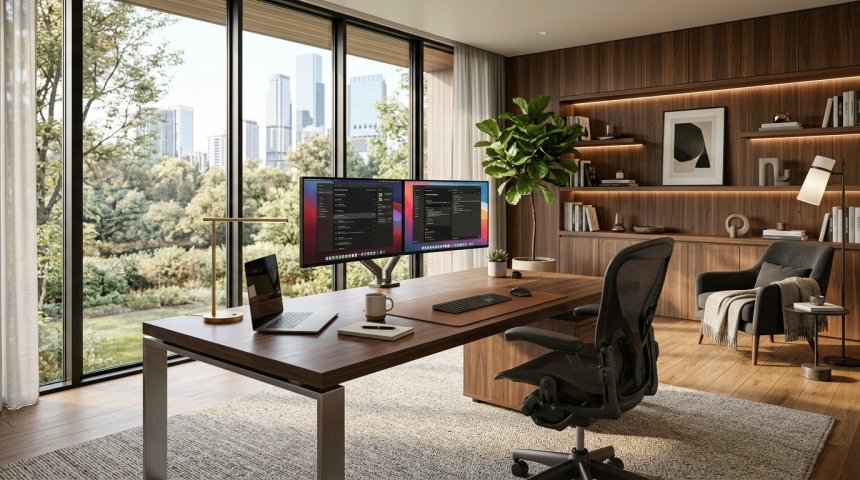
Quick Answer: What high-end home offices get right, and how to copy it?
Yes, achieving a professional executive workspace at home relies less on expensive brand-name luxury items and more on precise ergonomic alignment, glare-free lighting, and deliberate workstation geometry. You can replicate these spaces by prioritizing correct desk height, positioning monitors at eye level, and establishing zones for distinct tasks. While high-end installations often feature custom millwork and integrated smart systems, any room can achieve the same functional performance using modular furniture and thoughtful layout planning. Before buying new furniture or making structural changes, check your budget, available floor space, lighting conditions, acoustic needs, seating adjustability, and equipment connectivity.
The Anatomy of an Executive Workspace
When people step into a professionally designed corporate office or a high-end residential workspace, they often notice a distinct sense of calm and order. This feeling is rarely an accident. It is usually the result of deliberate spatial planning, careful material selection, and strict adherence to human physical dimensions. Luxury home offices do not look or feel functional merely because the furniture cost a fortune. They work because the designers understand how the human body interacts with its surroundings over an eight-hour workday.
To recreate this environment, you must move past surface-level aesthetics and examine the mechanics of daily work. Many homeowners make the mistake of buying visually striking chairs or desks without checking if those pieces fit their bodies. A truly effective workspace accommodates physical health, reduces mental fatigue, and keeps necessary tools within arm's reach. By analyzing the core principles behind high-end design, anyone can build a home workspace that delivers the same level of comfort and focus without requiring an unlimited budget.
Ergonomic Alignment Over Visual Luxury
The single biggest difference between a poorly designed workspace and a high-end setup is how the furniture supports the human body. Luxury offices prioritize neutral posture, a concept heavily emphasized by safety organizations. According to the Occupational Safety and Health Administration, a neutral working posture involves keeping your head balanced in line with your torso, shoulders relaxed, elbows close to your body, wrists straight, and feet fully supported. You can review detailed ergonomic positioning guides on the OSHA Computer Workstations Guidelines.
Many amateur home offices feature beautiful mid-century wooden chairs that look stunning in photographs but offer zero lumbar support or height adjustment. High-end setups correct this by investing in highly adjustable seating. A proper chair must feature adjustable seat depth, armrests that allow the shoulders to stay relaxed, and a stable five-leg base to prevent tipping. When copying this approach, do not spend money on designer labels if the chair lacks basic physical adjustability. Prioritize chairs that let you fine-tune every angle to match your specific height and weight.
Monitor Placement and Visual Ergonomics
Another area where high-end home offices excel is screen management. Staring at a monitor that is too high, too low, or too close forces the neck and eyes into unnatural angles, leading to fatigue and headaches by midday. High-end workspaces treat screens as adjustable elements rather than static fixtures bolted to a desk.
To replicate this, follow proper visual standards. Position your primary monitor directly in front of you so your neck remains neutral. The top edge of the screen should sit at or slightly below eye level. Distance matters just as much as height; place the monitor at least 20 inches away from your face, expanding that distance slightly if you use larger displays. You can find comprehensive hardware positioning advice through the OSHA Computer Workstations Monitor Components resource. Avoid crowding your desk with unnecessary items that push your monitor closer than intended. A deep desk surface provides the necessary real estate to achieve this ideal viewing distance safely.
Controlling Natural and Artificial Light
Lighting separates amateur spaces from professional ones. In a poorly planned room, glaring sunlight washes out computer screens, or harsh overhead bulbs create deep shadows and eye strain. High-end home offices treat lighting as a layered system rather than a single afterthought.
Instead of placing a desk directly facing or backing a bright window—which creates severe contrast issues—luxury designs place screens perpendicular to windows and use adjustable blinds or shades. High-end environments also avoid relying on one bright ceiling fixture. They use layered lighting that separates task lighting for paperwork from softer, ambient lighting for computer work. You can explore standard environmental control recommendations via the OSHA Computer Workstations Environment Guide. When copying this setup, use adjustable desk lamps with dimmable, warm-to-neutral LED bulbs to reduce glare on shiny desk surfaces and screen panels.
Managing Cords and Cable Chaos
Nothing ruins the clean, sophisticated look of a high-end office faster than a tangled nest of black wires spilling across the floor and desktop. Cable management is a hallmark of professional interior design. When wires are hidden, the mind perceives less visual clutter, which directly supports sustained concentration and lower stress levels.
High-end offices achieve this through built-in grommets, under-desk raceways, and magnetic cable clips. When building your own workspace, you do not need custom cabinetry to achieve a wire-free appearance. Inexpensive J-channel cable trays screwed to the underside of a wooden desktop can catch power strips and adapter bricks, keeping them off the floor entirely. Use Velcro ties instead of plastic zip ties so you can easily swap out peripherals later without cutting cords. Routing power cables straight down behind desk legs creates a streamlined profile that instantly mimics professional architectural design.
Acoustic Control and Soundscaping
Sound plays an invisible yet powerful role in productivity. High-end offices frequently incorporate acoustic treatments—such as upholstered wall panels, thick area rugs, heavy curtains, and solid-core doors—to dampen outside noise and reduce echo within the room.
If you participate in video calls or record audio, echo and background noise can severely undermine your professional image. While professional acoustic foam panels can be expensive, you can achieve similar sound diffusion using everyday items. Bookshelves packed with books of varying depths naturally break up sound waves and prevent flutter echoes. Adding a dense rug underneath your desk chair not only warms up a hard floor but also absorbs footsteps and rolling caster noise. Ensuring a quiet environment protects your focus and keeps virtual meetings sounding crisp and clear.
Surface Materials and Tactile Quality
The materials chosen for a workspace dictate how it feels to inhabit for hours at a time. Luxury offices often feature solid hardwoods, matte-finished veneers, leather desk mats, and brushed metal accents. These materials are selected for their appearance, tactile warmth, and durability.
When setting up your own space, avoid cheap particle board desks with shiny plastic laminates that show fingerprints and reflect light awkwardly into your eyes. If solid walnut or oak is out of your budget, look for sturdy frames paired with matte linoleum or high-pressure laminate tops that resist scratches and glare. Adding a quality leather or felt desk pad provides a comfortable surface for writing, protects your wrists from cold desk edges, and anchors your keyboard and mouse in place.
The Role of Height-Adjustable Worksurfaces
Sitting statically for eight to ten hours is detrimental to physical health, a fact well-documented by workplace safety experts. High-end home offices frequently utilize motorized sit-stand desks, allowing professionals to alternate postures throughout the day.
According to safety guidelines, an adjustable worksurface accommodates a wider variety of physical dimensions and encourages regular movement, which helps reduce muscle fatigue. When investing in a standing desk, verify its stability at maximum height. Cheap standing desks often wobble severely when typing vigorously. A high-end experience requires a dual-motor frame that rises smoothly and remains rock-solid at every height increment. You can read more about workspace purchasing benchmarks through the OSHA Computer Workstations Purchasing Guide.
Zoning Your Room for Multi-Tasking
High-end offices are rarely cramped single-surface rooms. When square footage permits, designers create distinct zones: a primary computing zone, a reading or reviewing chair away from the computer, and sometimes a collaborative small meeting area.
Switching physical locations for different tasks helps the brain transition between deep analytical work, creative brainstorming, and passive reading. If your home office is too small for multiple pieces of heavy furniture, you can still create micro-zones. Keep one side of the desk entirely clear of electronics for reviewing physical paperwork or sketching, reserving the main monitor setup exclusively for digital execution. This spatial discipline prevents mental burnout and keeps your primary desk from becoming a chaotic dumping ground for random items.
Integrating Technology Seamlessly
High-end workspaces embrace technology, but they do so without letting hardware dominate the visual landscape. Laptops, tablets, and desktop towers are connected via docking stations hidden out of sight. Monitors are mounted on sleek articulating arms rather than bulky plastic stands, freeing up valuable desk space underneath.
If you rely on a laptop for daily work, avoid working directly on the laptop keyboard and screen for long stretches, as this forces you to hunch over. OSHA safety checklists recommend using a separate external keyboard and mouse while elevating the laptop screen or connecting it to an external monitor at eye level. This simple adjustment bridges the gap between portable convenience and ergonomic health. You can review workstation evaluation checklists on the OSHA Computer Workstations Evaluation Guide.
Air Quality and Indoor Environment
A truly high-end office accounts for sensory inputs beyond sight and sound. Air quality directly impacts cognitive function, energy levels, and overall comfort. Stuffy rooms with poor ventilation lead to drowsiness and reduced decision-making capability.
Luxury offices often integrate advanced HVAC filtration or smart ventilation systems. In a home setting, you can replicate this by incorporating indoor plants known for durability and air conditioning tolerance, or by using a quiet HEPA air purifier with an activated carbon filter. Ensuring proper air circulation and maintaining comfortable humidity levels prevents the room from feeling stale during long closed-door sessions. Check the OSHA Computer Workstations General Environment page for further details on office climate factors.
Curating Minimalism and Personal Artifacts
There is a fine line between a clean, minimalist workspace and a sterile, unwelcoming room. High-end home offices masterfully balance minimalist discipline with curated personal touches. You will not find random piles of mail or scattered sticky notes, but you might find a carefully framed piece of art, a vintage clock, or a sculptural ceramic catch-all tray.
When styling your office, ruthlessly declutter surfaces. Store lesser-used office supplies inside drawers or closed cabinets rather than leaving them exposed on open shelves. Every item left on display should either serve a daily functional purpose or bring genuine psychological comfort. This curated restraint reduces visual distraction and allows you to enter a focused flow state much faster each morning.
Balancing Style and Budget Constraints
Replicating a high-end office does not mean matching every luxury price tag dollar for dollar. It means understanding the underlying design rules—ergonomics, cable management, glare control, lighting layering, and material quality—and applying them strategically. You can buy a second-hand commercial-grade ergonomic chair for a fraction of its retail price, pair it with a solid butcher-block countertop from a home improvement store, and mount it on a sturdy aftermarket standing desk frame.
By focusing your spending where it matters most—your seating, lighting, and monitor placement—you achieve the exact same physical benefits and visual elegance as an executive suite. Treat your home workspace as a finely tuned instrument rather than a decorative afterthought, and your daily productivity and physical well-being will reflect that investment.
Frequently Asked Questions
What is the most important ergonomic adjustment in a home office?
The most critical adjustment is setting your chair height and desk relationship so your feet rest flat on the floor, your knees bend at a ninety-degree angle, your shoulders remain relaxed, and your elbows form a comfortable ninety-to-one-hundred-degree angle while typing. This neutral posture prevents long-term musculoskeletal strain and reduces daily fatigue.
How can I improve poor lighting in a windowless office?
In a room without natural light, avoid relying on a single overhead bulb. Instead, use layered artificial lighting by combining a dimmable LED ceiling fixture with a focused desk lamp for reading and a warm ambient floor lamp to bounce light off the walls. This approach mimics natural daylight distribution and prevents severe eye strain.
Are standing desks truly necessary for a productive workspace?
Standing desks are not strictly mandatory, but they provide significant flexibility by allowing you to alternate your posture throughout the day. The core requirement is movement and postural variety, whether that means switching between a seated and standing position or taking regular physical breaks to walk and stretch.
What is the best way to hide messy cables on a budget?
You can easily conceal cords by screwing an inexpensive plastic or metal J-channel raceway underneath your desktop to catch power strips and adapter bricks. Combine this with reusable Velcro ties to bundle excess wire length, routing the main power drop straight down behind a desk leg to keep everything out of sight.
How far away should my computer monitor be placed?
Your primary monitor should sit directly in front of you at a distance of roughly twenty to forty inches, depending on screen size and your personal vision needs. Position the top edge of the screen at or slightly below eye level so your neck remains in a neutral, strain-free alignment.
Can a laptop serve as a primary computer without external accessories?
Using a laptop flat on a desk for extended periods forces you to look down and hunch your shoulders, leading to neck and upper back pain. To work safely and productively, connect your laptop to an external monitor, use a separate keyboard and mouse, and raise the screen to proper eye level.
Long-Term Maintenance and Upkeep of Your Professional Workspace
Once your home office is fully configured and optimized, maintaining its performance requires the same level of deliberate attention as setting it up. High-end professional environments do not remain pristine by accident; they rely on regular physical maintenance, digital hygiene, and seasonal adjustments to preserve their ergonomic and aesthetic value.
Preserving Ergonomic and Mechanical Systems
If you have invested in motorized sit-stand desks, high-end ergonomic chairs, or articulated monitor arms, these mechanical systems require periodic checks. Over time, heavy daily use can cause desk frame bolts to loosen, resulting in minor wobbles during typing. Make it a habit every six months to inspect and tighten all fasteners, hex screws, and mounting brackets.
Similarly, check the tension on gas-spring monitor arms. If your monitors begin to sag or drift out of position, a quick adjustment using the built-in tension screw will restore smooth, effortless vertical movement. For office chairs, inspect the caster wheels for trapped hair, dust, or carpet fibers that can impede smooth rolling. Cleaning these out annually prevents floor scuffs and keeps the chair moving fluidly across your protective floor mat or rug.
Managing Visual and Physical Clutter Creep
Even the most meticulously designed workspaces are vulnerable to "clutter creep"—the gradual accumulation of coffee mugs, charging bricks, reference books, and miscellaneous paperwork over weeks and months. To combat this, establish a weekly five-minute reset routine at the end of your work week.
- Clear the desktop entirely: Wipe down the surface using a cleaner appropriate for your material—whether that is wood soap for solid hardwoods or a damp microfiber cloth for laminate tops.
- Return items to designated zones: Put reference books back on shelves, return charging accessories to their drawers, and dispose of accumulated paper waste.
- Inspect cable routing: Ensure that no new wires have slipped out of your under-desk raceways or magnetic clips. Keeping cables securely anchored maintains the clean, architectural silhouette that defines a luxury office.
Seasonal Lighting and Climate Adjustments
Your office environment must adapt to changing seasons. A workspace that feels comfortably illuminated in midsummer may feel shadowy and dim during short winter days. Review your layered lighting setup as natural daylight hours shift. You may need to adjust the color temperature or brightness of your bias lighting behind the monitor to prevent harsh contrast against dark winter windows.
Likewise, monitor the indoor climate. Heating systems in winter and air conditioning in summer can drastically alter humidity levels, which affects not only your personal comfort and respiratory health but also natural wood furniture. Solid wood desks can suffer from micro-cracking if exposed to extreme dryness or rapid temperature shifts. Using a quiet desktop humidifier in winter or ensuring proper ventilation keeps both you and your furniture in peak condition.
Treating your home office as an active workspace that requires minor ongoing care rather than a one-time interior design project protects your physical health, sustains your daily focus, and ensures your room continues to function well for years to come.
Cultivating a Flow State Through Environmental Design
Beyond physical layout, lighting, and ergonomics, a truly high-end home office serves a psychological purpose: it acts as a trigger for deep, uninterrupted concentration. The most successful workspaces are engineered to reduce cognitive friction, allowing you to transition from distraction to a state of deep focus with minimal mental effort. When every element in your environment—from the tactile feel of your input devices to the acoustic absorption of your walls—operates seamlessly, your brain expends less energy processing environmental noise and more energy solving complex problems.
Acoustic Control and Soundscaping
Noise pollution is one of the most insidious disruptors of productivity in a home environment. Whether it is traffic outside, family members moving through adjacent rooms, or the low hum of household appliances, ambient sound forces the brain to constantly filter out distractions, leading to mental fatigue by midday. High-end architectural offices tackle acoustics deliberately, using a combination of sound-absorption materials and strategic layout choices.
You do not need an acoustic engineer to achieve professional-grade sound control in your home office:
- Soft Surface Integration: Hardwood floors and bare drywall bounce sound waves, creating an echoey environment that amplifies every keyboard click and spoken word. Layering a thick wool rug over a dense felt underpad absorbs footfall and airborne noise.
- Upholstered and Wood Elements: Heavy drapery, upholstered guest seating, and slatted wood wall panels increase the visual warmth of the room and diffuse sound waves rather than reflecting them directly back at you.
- Door Sealing: If your office shares a wall with a high-traffic area, installing a solid-core door instead of a hollow-core door reduces sound transmission. Adding acoustic weather-stripping around the door frame seals the gap where sound typically leaks in.
- Targeted Sound Masking: If structural soundproofing is beyond your budget or rental constraints, use a dedicated white noise machine or a high-quality speaker playing ambient brown noise to mask erratic household sounds and smooth out the auditory background.
Digital Hygiene and Workspace Transition Rituals
Just as physical clutter breeds mental distraction, digital clutter degrades your focus. High-end home offices maintain a clean boundary between work execution and digital chaos. When you sit down at your desk, your digital environment should be as deliberate as your physical one.
Start by organizing your digital workspace. Keep your primary desktop free of random files and temporary downloads. Utilize a single, ultra-clean wallpaper or a neutral solid color to prevent visual fatigue. More importantly, establish a clear transition ritual at the beginning and end of each workday.
A startup routine—such as opening your window blinds, adjusting your desk to your preferred morning height, and launching your primary task management software—signals to your brain that it is time to work. Conversely, a shutdown routine—closing all active applications, returning your notebook to its drawer, and wiping down your desk surface—creates a hard psychological boundary between professional responsibilities and personal rest. This ritual prevents work from bleeding into your evening hours, protecting the restorative downtime necessary for sustained long-term productivity.
Future-Proofing Your Workspace
Technology, work habits, and personal needs evolve over time. A workspace built strictly for a single moment in time risks becoming obsolete the moment your workflow changes—such as shifting from solo writing to frequent video conferencing, or adding a secondary monitor to your setup.
High-end home offices are designed with modular flexibility in mind. When selecting foundational pieces like desks, chairs, and shelving units, prioritize versatility:
- Modular Power and Cable Infrastructure: Ensure your under-desk cable management can accommodate additional power bricks or data lines without requiring you to tear down your entire setup. Using a power rail with surge protection built into the desk frame makes adding new peripherals effortless.
- Scalable Mounting Solutions: Articulating monitor arms with high weight capacities and standard VESA mounts allow you to swap from a single ultra-wide screen to dual monitors without having to replace the core support hardware.
- Adaptable Lighting: Choose smart bulbs or dimmable fixtures that allow you to adjust both color temperature and intensity, ensuring your lighting can adapt whether you are reviewing fine print on paper late at night or conducting a video call under bright midday illumination.
By building adaptability directly into your spatial and technical planning, you ensure that your home office remains a high-performance asset through every stage of your professional journey. Treating the workspace as an evolving, living system guarantees that your investment in comfort, health, and focus will pay dividends for years to come.
To maintain visual comfort and prevent eye strain, pay close attention to your computer monitor's placement. OSHA recommends positioning your primary screen directly in front of you at a viewing distance of roughly twenty to forty inches, ensuring the top edge sits at or slightly below eye level so your neck remains in a natural, neutral alignment (source: OSHA Computer Workstations Components Monitors). Managing environmental glare by placing screens perpendicular to windows and using layered lighting prevents the visual fatigue common in poorly planned rooms (source: OSHA Computer Workstations Environment).
Share
What's Your Reaction?
 Like
0
Like
0
 Dislike
0
Dislike
0
 Love
0
Love
0
 Funny
0
Funny
0
 Angry
0
Angry
0
 Sad
0
Sad
0
 Wow
0
Wow
0